
Nuxt SaaS case study: from idea to $1,120 MRR in 30 days

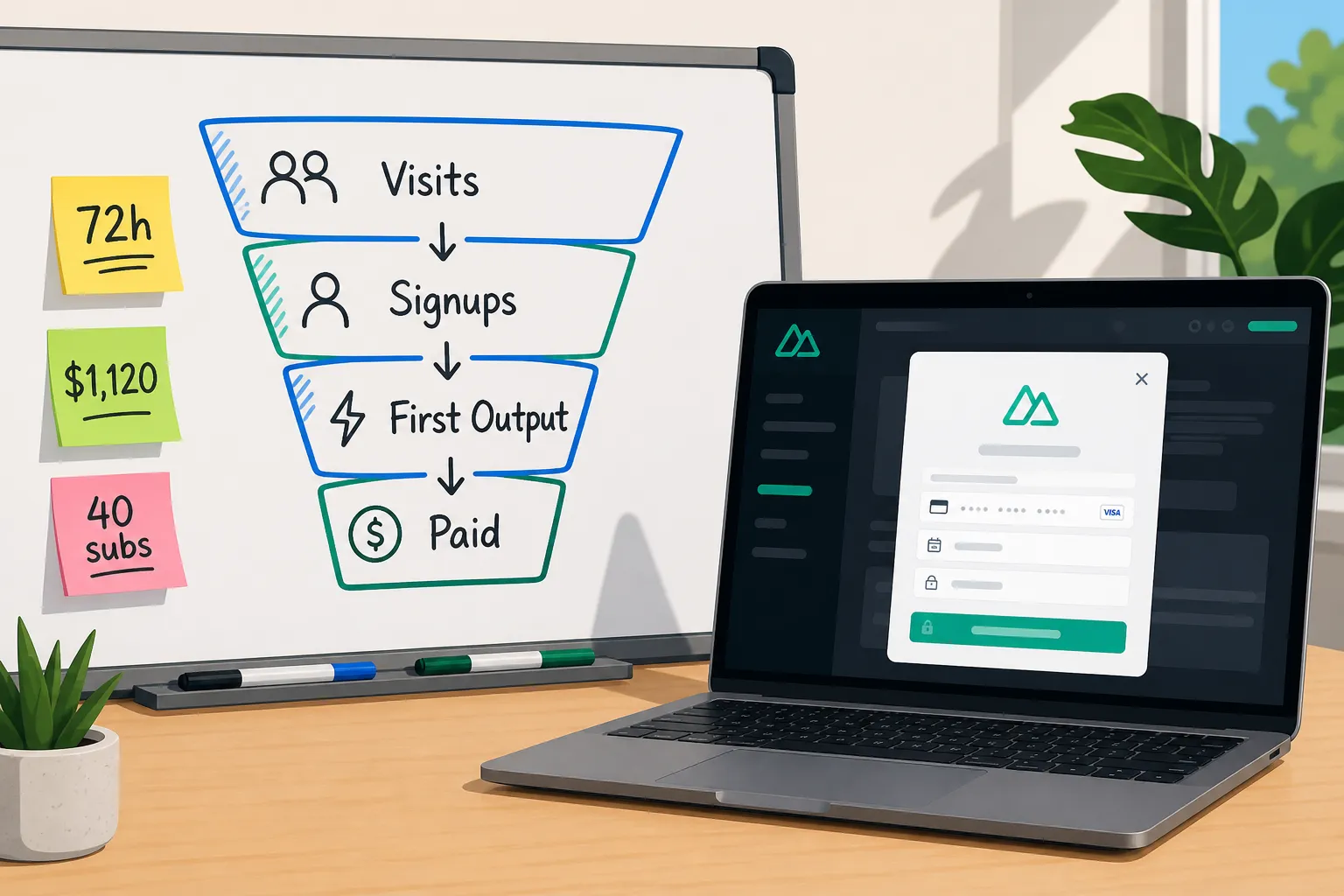
You want to ship a paid AI tool fast, not spend your month on user tables and billing webhooks. This is our playbook. Two engineers, nights and weekends, took a clean Nuxt repo and turned it into a paid product doing $1,120 MRR in 30 days. The difference was choosing a Nuxt starter kit that already handled auth, payments, admin, i18n, analytics, SEO, and a launch-ready marketing site, so we could put almost all our time into the feature and pricing.
Starting point and constraints
Goal: validate a focused AI copy helper for small agencies and reach $1k+ MRR in the first month. Inputs: two engineers with Nuxt/Vue experience, a small email list of 1,800, and very little appetite for building plumbing. Definition of done: real users generating outputs, working subscriptions on two plans ($19 and $49), and a clean admin to keep spam out.
We tracked three activation milestones from day one: time to first payment, percent of new users producing at least one output in 7 days, and MRR at day 30. We used the kit’s built-in analytics for events and funnels instead of wiring dashboards.
Buy vs build: what we refused to code
Our whiteboard list of non-negotiables looked like this. Estimated build times are from similar past projects:
- Authentication (email, magic link, Google) with protected pages: 25 - 35 hours
- Subscriptions, receipts, and webhooks with a switchable provider: 20 - 30 hours
- Admin area for users, roles, and abuse controls: 12 - 18 hours
- Database models, migrations, and a typed ORM: 10 - 15 hours
- File storage for generated assets: 6 - 10 hours
- Transactional emails (welcome, reset, receipts): 6 - 10 hours
- SEO basics (sitemap, meta tags, Open Graph): 6 - 8 hours
- Analytics and funnels: 6 - 8 hours
- Marketing site with a solid landing page and blog: 10 - 15 hours
Total: about 100 - 150 hours before touching the core feature. We bought a Nuxt boilerplate that shipped all of it and focused on the product.
The kit gave us authentication with email/password, magic links, and Google sign-in, plus middleware to gate paid features. Checkout flows supported one-time and subscriptions. An admin panel let us review users, manage accounts, and ban spammers in minutes. It included a preconfigured database with an ORM and typed migrations, S3-compatible storage, transactional email templates, i18n with a language switcher, SEO automation for meta/OG/sitemap, built-in analytics, and a landing page we could rewrite without touching CSS.
For the core feature, the kit’s AI utilities supported chat, text, and image generation with switchable models, which made cost-versus-quality tests trivial. We kept our stack boring and our time focused.
Implementation timeline
Days 1 - 3: Foundation and first output
Day 1 was setup. We pulled the repo, set environment variables for app URL, database, storage bucket, and email provider, then ran initial migrations. We enabled email/password and Google sign-in, turned on middleware to protect app routes, and connected our payment provider through the kit’s config. We edited the landing page copy, pricing blocks, and hero image. Working shell in production: under 6 hours.
Day 2 we wired a brief form to text generation: industry, goal, tone, and a content prompt. We added a developer-only switch to toggle the model and temperature for testing. Day 3 we added image generation for social banners, saved outputs to storage, and wrote a simple “generations” table to log user, input, tokens, and time.
Days 4 - 7: Pricing, gating, and polish
We created two subscription plans and mapped plan IDs to features. Advanced options were visible but disabled until sign-in, and exporting or saving outputs required an active subscription. We connected a usage counter to the ORM so each plan could have monthly credits without rework later.
We customized transactional emails with clear sender details, plain subjects, and a single CTA: “Create your first output.” We set up meta tags and dynamic Open Graph images per route, and we published our first blog post using Nuxt Content to target phrases like nuxt starter kit and nuxt saas template. A couple of early posts did not index. RankGoat’s backlink building service includes a clear explainer, Google indexing issues: diagnose and fix them fast, which helped us confirm sitemap submission, fix a canonical mismatch, and avoid blocking the content directory in robots.txt.
Analytics events we tracked from the start: view_home, sign_up, first_output, start_checkout, and purchase_completed. We built three funnels: home → signup, signup → first output, and first output → paid. A nightly cron emailed new users who had not created an output yet with a short tip and a direct link back to the brief form.
Days 8 - 14: Private beta and i18n
We invited 50 agency contacts. The admin panel made it easy to merge test accounts and ban obvious spam. Feedback asked for a Spanish UI. We enabled the language switcher and translated the top 20 strings in the app shell, brief form, and checkout. We also changed the default model to cut average generation cost by 23 percent without hurting quality, based on blind side-by-side samples.
Days 15 - 21: Public launch
We launched publicly with the refined landing page, two plans, a simple FAQ, and usage examples above the fold. We published two more blog posts and sent a focused announcement to our list. Analytics showed most signups came from the hero CTA and pricing section, so we resisted design churn and kept edits to copy and headings.
Days 22 - 30: Smoothing friction
We added a usage dashboard that shows credits, recent outputs, and upgrade prompts when users near limits. We trimmed checkout copy after seeing a drop-off between address and payment step. We updated transactional emails to link straight to saved drafts and added a weekly wrap email that surfaces high-performing outputs to re-engage light users.
Launch metrics and MRR
Time to first payment: 72 hours. Our first subscriber arrived on Day 4 and proved the path.
Days 1 - 10 public: 2,320 unique visitors, 14 percent signup rate (325 accounts), 41 percent of signups produced at least one output, and 6 percent of signups converted to paid within 48 hours. That was 19 subscribers, split 12 on $19 and 7 on $49, for $601 MRR. Most traffic came from our list and social. The blog started contributing a small but steady trickle by Day 10 after we fixed indexing.
Days 11 - 20: 3,100 more visitors, 11 percent signup rate (341), and 24 new subscribers. Tightening landing copy and simplifying checkout helped. Admin tools cut spam to near zero. Daily reminders increased first-output rates by 9 percentage points.
By Day 30: 7,940 visits total, 1,020 signups, and 40 active subscribers split across 28 on $19 and 12 on $49. That is $1,120 MRR with minimal churn in month one. Analytics showed the Spanish UI drove 18 percent of new signups, which justified the early i18n work. Blog traffic reached 9 percent of total with almost no manual SEO work beyond publishing and keeping sitemap and canonicals correct.
All of this happened without touching a custom analytics stack or hand-rolling auth. The Nuxt starter kit gave us rails so we could iterate on pricing, positioning, and prompts.
Post-launch learnings
- Ship rails, not scaffolding. Buying a Nuxt SaaS boilerplate that includes auth, protected pages, payments, admin, analytics, SEO automation, i18n, and a landing page converted multi-week chores into checkboxes.
- Wire payments on day one. A working checkout in staging sharpens pricing and packaging. We tested annual vs. monthly and one-time add-ons without code churn.
- Track activation with events you can change later. We used first_output as the main early signal. When we saw a gap, we sent one helpful email and simplified the form, not five generic nudges.
- Publish early and fix indexing fast. Automatic meta tags, OG images, and a sitemap are table stakes. The quick indexing check saved us from waiting a week to find a canonical issue.
- Make i18n a fast follow. Translating the top 20 strings took hours and opened a second acquisition lane immediately.
- Gating should be obvious. We let guests try the brief and see watermarked outputs, but saving, exporting, and advanced controls required a subscription. The contrast made the upgrade path clear without pop-ups.
Key takeaways
- 72 hours to the first payment because authentication, billing, and the landing page were already done.
- $1,120 MRR by Day 30 from 40 subscribers across $19 and $49 plans.
- Analytics events and simple funnels guided changes that lifted activation and reduced checkout drop-off.
- SEO automation plus fast indexing fixes put the blog to work in week one.
- Built-in AI utilities let us tune cost vs. quality and ship features users actually valued.
FAQ
What parts of the Nuxt starter kit saved the most time?
Authentication, protected pages, subscription checkout, the admin panel, built-in analytics, SEO automation, and the prebuilt landing page cut weeks of setup.
How fast can I accept payments with this Nuxt SaaS template?
We connected a provider and tested live checkout within the first 24 hours, then took our first real payment on Day 4.
Can I build and sell an AI tool online with this kit?
Yes. It includes AI chat, text, and image generation with switchable GPT models, plus auth and subscriptions to gate and sell access.
Does it support multi-language from day one?
Yes. It ships with multi-language support and an in-app language switch, so you can add translations quickly.
How did you track signups and conversions without extra tools?
We used the kit’s built-in analytics to watch pageviews, signups, first outputs, and paid conversions, then adjusted copy and emails.
Recommended resources
Ready to ship your SaaS?
Nuxt Plugin Playbook: Ship Faster with 15 Real Patterns
A practical Nuxt plugin playbook for SaaS: auth, payments, i18n, SEO, analytics, AI, marketplace hooks, plus when a Nuxt starter kit is the faster path.
Nuxt SaaS case study: launching an MVP in 10 days
How we shipped a paid AI MVP in 10 days with a Nuxt starter kit. Real metrics on traffic, signups, conversions, revenue, and the exact features we used.