
How to Ship Faster with a Nuxt SaaS Starter Kit for Web Apps

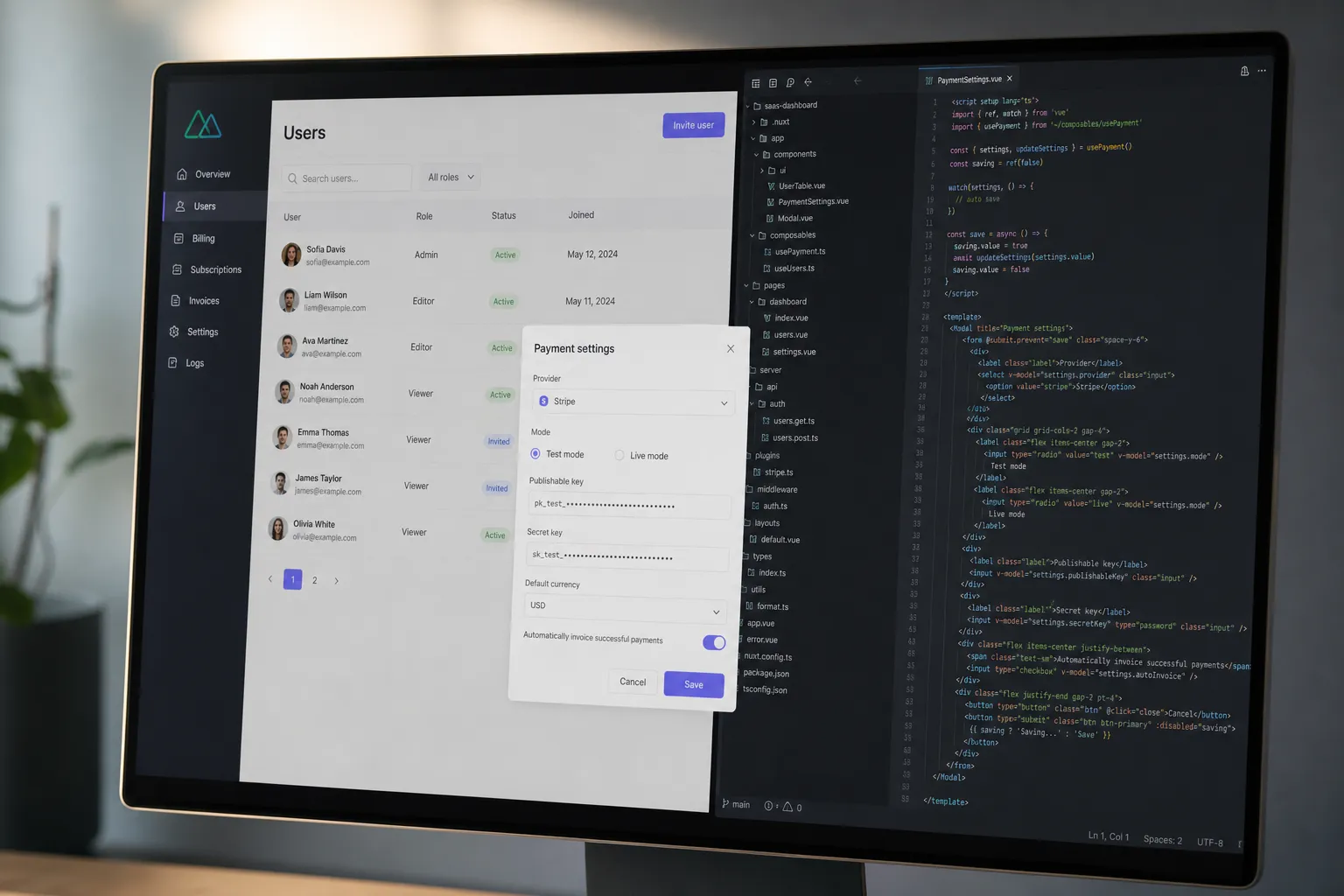
You want to ship features and charge for them, not wire auth for the third time. A focused Nuxt/Vue starter kit compresses the first month into a week: signups, checkout, localization, admin, content, and deployment are already wired so you can test pricing, copy, and usage with real customers. Below is the checklist I use, why Nuxt fits paid apps, a 7-day build-and-sell plan, and how to pick a boilerplate you will not regret.
The essentials your SaaS starter kit must ship with
Skip grab-bag templates. Look for the pieces that unblock paid usage on day one and keep you safe when traffic arrives.
Core product plumbing
- Authentication that matches your paywall. Email + password, magic links, a social provider, and password reset. Protected routes via Nuxt route middleware, not ad hoc checks. Clerk, Supabase Auth, Lucia, or Auth.js work well in Nuxt. You need this to test feature gating and trials immediately.
- Payments that survive real-world edge cases. Start with Stripe for cards and usage-based metering. Have a path to Paddle or Lemon Squeezy if you need EU VAT handling or buyer invoicing later. Webhooks should be first-class in the repo via Nitro server routes, with clear handling for trial started, invoice paid, and subscription canceled.
- Typed ORM and safe migrations. Postgres plus Prisma is a reliable default. Seed scripts and a repeatable migration command must exist so you can add columns daily without fear. Types should flow from your schema into your Vue components.
- File storage that works in production. S3-compatible buckets like R2, S3, or Backblaze with signed URLs. Client never sees raw bucket keys. Image thumbnails and PDF previews are generated on the server to avoid client bloat.
- Transactional email. Resend or Postmark with prebuilt templates for verify email, reset password, receipt, and failed payment. Templates should accept your logo, brand colors, and footer links without editing HTML.
- Admin area you are not afraid to use. User search, plan status, impersonate user for support, refund link-out, and ban/delete. You will use this daily in the first month.
Operations and growth
- Analytics you can act on. Pageviews, funnel from visit to signup to payment, and per-feature usage. Track events in one place so copy changes and UX tweaks show up as improved conversion, not vibes.
- SEO and content out of the box. Automatic meta tags, canonical URLs, sitemap, Open Graph, and Nuxt Content for docs and a blog in the same repo. Your first 10 visits per day will come from a mix of content shares and long-tail searches.
- Jobs and schedules. Cron-style tasks for reminders, cleanup, and daily digests using Nitro tasks or your host’s scheduler. Retries and idempotency keys prevent duplicate sends.
- Prebuilt marketing pages. A landing page with pricing, FAQs, and social proof components so you can go live in hours, not days.
If you are building an AI tool
- Switchable models and quotas. Server-side wrappers for OpenAI, Anthropic, or local models, with per-plan token or request quotas enforced before the model call. This avoids surprise overages.
- File-to-AI workflows. PDF and image ingestion, chunking, and storage. Rate limiting and circuit breakers on generation endpoints.
- Dev ergonomics. A codebase that plays well with Cursor and Claude so small teams can iterate. Keep PRs small and favor server routes over client-heavy SDK calls.
Why Nuxt + Vue is a fit for paid apps
Nuxt gives you server rendering, API routes through Nitro, and file-based routing that maps cleanly to paywalls and dashboards. Vue’s single-file components keep UI work readable, and reactivity stays predictable as features grow. That combination lets you ship a pricing page in the morning, wire checkout after lunch, and review signups in an admin table before you clock out.
Practical advantages for SaaS:
- Paywall logic where it belongs. Route middleware enforces auth and plan checks on server-rendered pages and API routes. You can add a
middleware/auth.tsonce and reuse it everywhere. - Real-world integrations stay in-repo. Stripe, Paddle, or Lemon Squeezy webhooks live under
server/routes/with tests. No separate microservice just to confirm payment events. - Internationalization without pain.
@nuxtjs/i18nprovides language switchers, route prefixes, and translated meta tags. That covers your first non-English customers and improves SERP coverage. - Content and app in one codebase. Nuxt Content turns markdown into a fast docs site and blog with search and code blocks. Release notes and tutorials ship as part of the app deploy.
- Deploy anywhere. Nitro targets let you deploy to Vercel, Netlify, Cloudflare, or a Node server. Pick the host that fits your data and cost constraints.
A 7-day build-and-sell plan
Ship a narrow slice, charge for it, and learn. Repeat the loop weekly.
Day 1–2. Launch the offer and gate it
- Publish the included landing page. Keep the hero line specific to a job-to-be-done and add a 3-bullet value list. Put pricing above the fold with one monthly plan and one annual plan.
- Enable auth and protected routes. Create
/appbehind auth and leave/pricingpublic. Add a trial flag to the user table. - Connect Stripe in test mode. Create one product with monthly and annual prices. Add a simple webhook handler for
checkout.session.completedthat sets plan status and trial end. - Turn on analytics. Track visit, signup, checkout started, payment succeeded. Watch the funnel, not just pageviews.
Day 3–4. Ship one useful feature
- Model your first entity in Prisma, run a migration, and seed a demo row for screenshots.
- If you need uploads, wire S3-compatible storage with signed PUT URLs and store only metadata in your DB. Render thumbnails server-side.
- Send a transactional email on success. Use a prebuilt template and include a deep link back to the completed item.
- Add a usage meter to the navbar so users see remaining quota. Paid plan removes or raises the cap.
Day 5. Close the loop
- Create a daily or weekly digest job with Nitro’s scheduler. Include progress, a quick tip, and a link to return to the app.
- Ship a short changelog post via Nuxt Content and link it in the app footer. Update meta tags and OG images on your landing page.
- Fix the top friction point you see in the funnel. Examples: too many fields on signup, confusing plan copy, or unclear success states.
Day 6–7. Hygiene and pricing checks
- Review new users in the admin. Impersonate two or three to confirm onboarding works as expected. Ban obvious spam.
- Test a second price point or an annual discount. Keep just one upsell at a time so results are readable.
- Send a welcome email with one clear action and a 2-minute path to value. Remove anything that slows that first win.
If your product is AI-first
Start with one workflow, not a playground. Examples: summarize uploaded PDFs into action items, or generate alt text for product images. Put the feature behind a protected page, enforce a small free quota server-side, and log which prompts correlate with payments. Keep prompts in version control and attach prompt version to each completion so you can trace regressions.
How to choose a Nuxt boilerplate without regret
Run this 30-minute evaluation before you buy:
- Demo path. Can you sign up, upgrade, use one feature, and receive an email without editing code? If not, you will be the one finishing it under deadline.
- Payments depth. Webhooks in repo, proration handled, trials supported, and a clean cancellation path. Multiple providers are a plus if you expect global buyers.
- Auth and admin. Real protected routes, session handling, and an admin that shows plan status and supports impersonation.
- Typed data flow. Schema-driven types across API routes and components. Migrations and seeding must be documented with copy-paste commands.
- i18n and SEO. Language switcher, localized routes, meta tags, sitemap, and a blog/docs system in the repo.
- Deployment story. One environment file, example CI, and deploy guides for at least two hosts. Webhook endpoints should work the same locally and in prod.
- Maintenance signal. Recent commits, clear changelog, and a way to apply updates without blowing away your app folder.
Buy when the demo proves your first feature with minimal edits. If checkout, admin, or auth are hand-waved in the demo, assume you will build them yourself.
Getting your first 100 users
Early traction is simple, not easy. Publish one helpful tutorial per week on your built-in blog, tie it to a feature you just shipped, and share a short clip or screenshot on the channels where your users already hang out. Watch which posts lead to signups and ship more in that direction.
If you lack time for outreach, consider a backlink building service that writes posts, secures dofollow links, and fixes indexing and technical issues so your pages can rank and appear in AI answers. Delegate the grunt work and keep your focus on product.
Keep pricing obvious. One monthly plan and one annual plan are enough at the start. Make cancellation a button, not an email address. Strong products do not hide behind friction.
Key takeaways
- A serious Nuxt SaaS starter kit covers auth, payments, admin, typed data, storage, email, analytics, SEO, content, and jobs.
- Nuxt + Vue speeds paid app work with SSR, file-based routing, Nitro server routes, i18n, and content in the same repo.
- Follow a 7-day loop: launch the offer, gate it, ship one feature, close the loop, then tune pricing and onboarding.
- If your app is AI-first, enforce quotas server-side, version your prompts, and track which prompts lead to payment.
- Choose a boilerplate that proves checkout, auth, and admin in the demo, with typed migrations and clear deploys.
Building a product is a set of tight feedback loops. Pick a Nuxt starter kit that gets you to that loop on day one, then keep shipping and measuring until the numbers make sense.
Recommended resources
Ready to ship your SaaS?
SaaS Post-Launch Checklist – 7 Steps to a Secure Startup
Just went live? Follow this SaaS launch checklist to harden your security and ensure your app is ready for scale. Simple steps for a professional foundation.
Best Nuxt Starter Kits for SaaS Projects (2026)
Looking for the best Nuxt starter kit? I've reviewed the top Nuxt boilerplates to help you find a stack that doesn't get in your way.