
Nuxt Middleware: A Practical Guide for SaaS and AI Apps

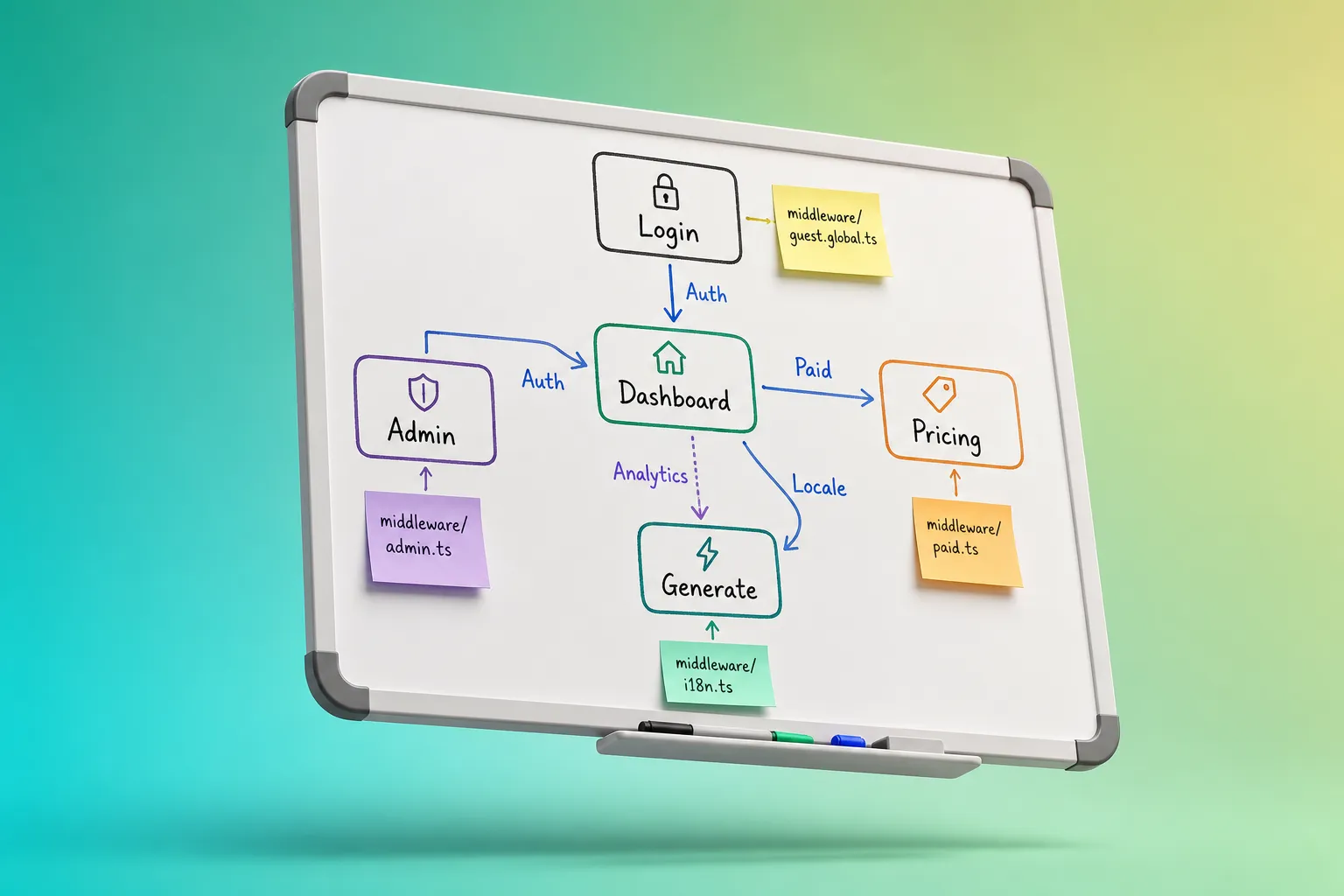
If your app has logins, paid features, multiple languages, and an admin area, routing rules pile up fast. Nuxt middleware keeps those rules consistent, testable, and easy to change without scattering checks across components.
Below is a practical stack we use on SaaS and AI tools. It favors small, named middlewares, clear redirects, and server-first checks so users never see protected pages flash.
What middleware does in Nuxt 3
Nuxt 3 gives you two layers:
- Route middleware. Runs before navigating to a page. Ideal for auth, plan gating, locale redirects, analytics. Files live in /middleware. Name them for selective use, or add .global to run on every navigation.
- Server middleware. Runs on the server for every request handled by Nitro. Use it for request logging, bot filtering, strict headers, and webhook signature checks. Files live in /server/middleware.
Route middleware runs on both server and client. You can make decisions on the first request on the server to avoid flicker, then reuse the same checks on the client for internal navigations.
// /middleware/auth.ts
export default defineNuxtRouteMiddleware((to) => {
  const { user } = useSession() // your app's composable/store
  if (!user.value) {
    return navigateTo(`/login?next=${encodeURIComponent(to.fullPath)}`)
  }
})
Build a reliable middleware stack
Write the rules before code
List the routes and the guardrails they need. A typical SaaS set:- Public routes anyone can view.
- Protected routes for logged-in users.
- Paid routes for active subscribers.
- Admin-only routes for your team.
- Language-aware routes that honor a user’s locale.
Write the behavior and the failure path in plain language. Example: “If a non-subscriber visits /generate, redirect to /pricing and remember where they came from.” This becomes the acceptance test for your middleware.Create an authentication guard
Add /middleware/auth.ts and redirect to login when there is no session. Always carry the intended destination.// /middleware/auth.ts export default defineNuxtRouteMiddleware((to) => { const { user } = useSession() if (!user.value) { return navigateTo(`/login?next=${encodeURIComponent(to.fullPath)}`) } })
If you use a Nuxt SaaS starter, session state and redirects are already wired, so the guard is a thin wrapper around a single source of truth.Gate paid features
Check subscription status in /middleware/paid.ts. If missing or expired, send users to pricing or checkout and preserve the next URL.// /middleware/paid.ts export default defineNuxtRouteMiddleware((to) => { const { user } = useSession() const { plan } = useBilling() // central plan/subscription state if (!user.value) { return navigateTo(`/login?next=${encodeURIComponent(to.fullPath)}`) } if (!plan.value?.active) { return navigateTo(`/pricing?next=${encodeURIComponent(to.fullPath)}`) } })
Keep plan state cached in session or a small store that is filled on login or page load so the middleware does not trigger extra round trips.Protect admin routes
Verify role in /middleware/admin.ts. Fail closed to a safe page.// /middleware/admin.ts export default defineNuxtRouteMiddleware(() => { const { user } = useSession() if (!user.value || user.value.role !== 'admin') { return navigateTo('/dashboard') } })
Mirror the role model from your Admin Panel to avoid drift. Admin checks should be strict and boring.Handle language with a global locale middleware
Pick a default on first visit, then respect user choice. Prefix the filename to control order.// /middleware/10-locale.global.ts export default defineNuxtRouteMiddleware((to) => { const cookie = useCookie('locale') const { setLocale } = useI18n()// First visit: guess from Accept-Language, set cookie, redirect to prefixed path if (!cookie.value) { const header = (process.server ? useRequestHeaders('accept-language')'accept-language' : navigator.language) || '' const guessed = header.split(',')0?.split('-')0 || 'en' cookie.value = guessed if (!to.path.startsWith(
/${guessed})) { return navigateTo(/${guessed}${to.fullPath}, { redirectCode: 302 }) } }// Later visits: apply the chosen locale without forcing redirects setLocale(cookie.value) })
Let the in-app language switch update the cookie or profile so the middleware follows the user’s decision.Track analytics without flicker
Record pageviews in a global middleware. Emit on the server when possible, then fall back to a client call.// /middleware/20-analytics.global.ts export default defineNuxtRouteMiddleware((to, from) => { const analytics = useAnalytics() const payload = { path: to.fullPath, referrer: from?.fullPath || null }if (process.server) { analytics.page(payload) } else { requestIdleCallback(() => analytics.page(payload)) } })
Keep event names consistent so you can answer, “Which protected routes cause the most logins?” or “Which plan gates are hit most often?”Use server middleware for low-level checks
Put request-wide concerns in /server/middleware. Keep handlers fast and stateless.// /server/middleware/webhooks.ts export default defineEventHandler(async (event) => { if (event.path.startsWith('/api/webhooks/stripe')) { const sig = getHeader(event, 'stripe-signature') const body = await readRawBody(event) if (!verifyStripeSignature(body, sig)) { throw createError({ statusCode: 400, statusMessage: 'Invalid signature' }) } } })Attach middleware in one obvious place
Use named middleware in pages viadefinePageMeta. Leave a short comment at the top describing the policy.// pages/generate.vue <script setup lang="ts"> definePageMeta({ middleware: 'auth', 'paid' }) // Policy: logged-in, active subscription required </script>
Document exceptions in the same way. Login, signup, pricing, and error pages should be exempt from auth and paid.
Patterns that hold up in production
Guest-to-paid upgrade
A public landing page links to an AI feature page that requires both auth and paid. If the visitor is logged out, send them to sign up. If logged in but not paid, send them to checkout. On success, return to the feature page with inputs intact so they can continue the workflow.
Localized onboarding
The first visit sets the initial locale from headers and redirects to a language-prefixed path. Thereafter, respect the user’s switch. This avoids loops and fights with the user’s choice.
Admin-only moderation
Admin routes run the auth and admin middlewares. Fail closed to the dashboard. Keep the Admin Panel and middleware checking the same role source of truth.
AI usage gates
Gate costly operations like generation, uploads, or long-running jobs. Apply auth and paid to chat, text, and image routes. That lets you measure demand and control spend from day one.
Pitfalls, tests, and tooling
- Infinite redirects. Whitelist login, signup, pricing, and error pages. Add a quick check at the top of auth and paid to skip on those routes.
- Client-only checks cause flicker. Ensure the critical checks run during the first server navigation so protected content never flashes.
- Slow async in middleware. Do not fetch user or plan data on every navigation. Hydrate a small store on login or initial load and read from it.
- Order surprises. Global middlewares run in filename order. Prefix them, for example 10-locale.global.ts and 20-analytics.global.ts, so intent is obvious in reviews.
- Untested failure paths. Write unit tests for each rule and a few end-to-end checks: expired plan, revoked admin role, missing locale cookie.
Middleware is small, but everything around it is not. A ready-to-buy Nuxt boilerplate removes a lot of setup. The shipahe.ad Nuxt starter includes protected pages, multiple authentication options, payment processing for one-time and subscriptions, multi-language support, transactional emails, a typed database with ORM, S3-compatible file storage, AI chat and generation with switchable models, cron jobs, a blog powered by Nuxt Content, analytics tracking, SEO tools, and a prebuilt landing page. It is built to work well with AI coding tools like Cursor and Claude.
As you refine rules, capture what feels rough for users. A public feedback workflow makes patterns obvious. See their practical guide to product feedback and running a feature voting board for a simple way to collect requests, auto-merge duplicates, and rank what to build next.
If you want a Nuxt SaaS starter that keeps middleware focused on policy while auth, payments, i18n, and analytics are already wired, a production-grade template will save weeks. Buy a boilerplate when you want to launch sooner and spend your time on product value, not plumbing.
Key takeaways
- Write routing rules in plain language first, then encode them as small, named middleware.
- Use global middleware for locale and analytics, named middleware for auth, paid, and admin.
- Run checks on the server during the first load to avoid flicker and leaks.
- Keep middleware fast. Cache what you can and test failure paths.
- A solid Nuxt starter kit gives you the surrounding auth, payments, i18n, and tracking so middleware stays simple.
FAQ
What is the difference between route middleware and server middleware in Nuxt 3?
Route middleware runs before navigating to a page and is great for auth, plan checks, locale, and analytics. Server middleware runs on every server request and is better for low-level tasks like request logging or webhook signature checks.
Where should I put Nuxt middleware files?
Put route middleware in the /middleware directory. Add .global to the filename for middleware that should run on every navigation. Put server middleware in /server/middleware.
How do I prevent infinite redirects with auth middleware?
Exclude login, signup, pricing, and error pages from auth and paid checks. Also remember to pass the original destination as a query so you can return the user after login or checkout.
Can I run async code inside middleware?
Yes, but keep it minimal and cache results. For example, store plan status on login so your paid middleware does not fetch it repeatedly on every navigation.
How do I test Nuxt middleware?
Write unit tests for each middleware function and add a few end-to-end tests for critical routes. Test both success and failure paths, including expired plans and missing roles.
Recommended resources
Ready to ship your SaaS?
Nuxt Folder Structure: A Practical Step-by-Step Guide
A practical Nuxt folder structure guide with setup steps, examples, and pitfalls to avoid so your SaaS stays organized, predictable, and ready to ship.
Nuxt Modules That Ship: Install, Configure, and Launch
Practical Nuxt modules guide: pick a lean stack, wire it in nuxt.config, add auth, payments, i18n, admin, and avoid gotchas that slow SaaS launches.